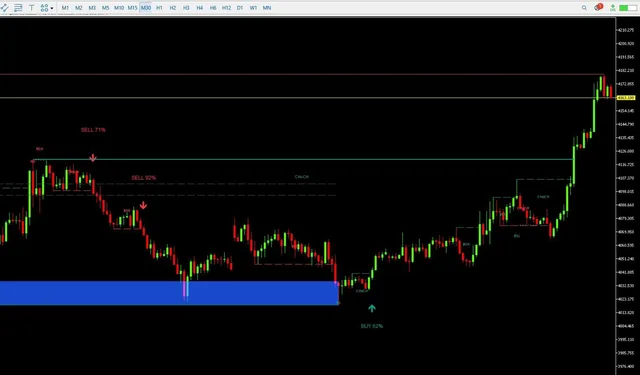
If you trade using Smart Money Concepts (SMC), you are probably familiar with concepts such as BOS, CHoCH, Order Blocks, Fair Value Gaps, Premium/Discount Zones, and Equal Highs/Equal Lows. The problem is that most SMC indicators on the market are either too cluttered (drawing all over the chart), too “silent” (not showing specific entry points), or so heavy that they make the chart lag.
SMC Buy Sell KPG was created to solve exactly those problems. It is an MT5 indicator developed by KPG Quant, combining the core SMC logic with an intelligent signal filter, helping you see market structure clearly while still receiving BUY/SELL signals with estimated win rates directly on the chart.
1. What is SMC Buy Sell KPG?
SMC Buy Sell KPG is an MT5 indicator in the Smart Money Concepts category. It works directly on the price chart (chart window) and does not require a sub-window. The indicator automatically detects:
- Swing Structure (BOS/CHoCH) and Internal Structure (smaller-timeframe BOS/CHoCH)
- Swing Points: HH / HL / LH / LL
- Order Blocks (both Internal and Swing) with mitigation logic
- Equal Highs / Equal Lows (EQH/EQL)
- Fair Value Gaps (FVG)
- Multi-timeframe Highs & Lows (Daily / Weekly / Monthly)
- Premium / Discount / Equilibrium Zones
- BUY/SELL signals with price-zone filters and estimated win rate
What makes it special: the indicator does not simply draw shapes, it also supports entry decisions based on multiple layers of confluence, helping you avoid “counter-trend” signals from the start.
2. Key features
a) Swing & Internal Structure
The indicator automatically identifies BOS (Break of Structure) and CHoCH (Change of Character) at both levels: Swing (main trend) and Internal (inner swings). You can filter separately: show only BOS, only CHoCH, or both.
- Swing Structure lines are drawn thicker; Internal Structure lines are dashed, so they are easy to tell apart.
- BOS/CHoCH labels can be customized with separate font sizes for Swing and Internal.
- Swing Points are displayed as HH/HL/LH/LL directly at the highs/lows.
b) “Smart” Order Blocks with filters and mitigation logic
This is the most highly rated part:
- Order Block Filter: choose between ATR (default) or Cumulative Mean Range, for higher-quality OBs and fewer OBs from noisy candles.
- Mitigation by Close or High/Low, depending on your strategy.
- Balanced Bull/Bear display: opposite-side OBs are never “lost” just because same-side OBs take all slots.
- Keep violated OBs visible (faded): the
Keep violated OBs visibleinput lets you see the history of breached OBs for backtesting and structure learning. - Customize the number of Internal OBs (1-20) and Swing OBs (1-20) displayed, with separate colors for each type.
c) BUY/SELL signals with multi-layer filters
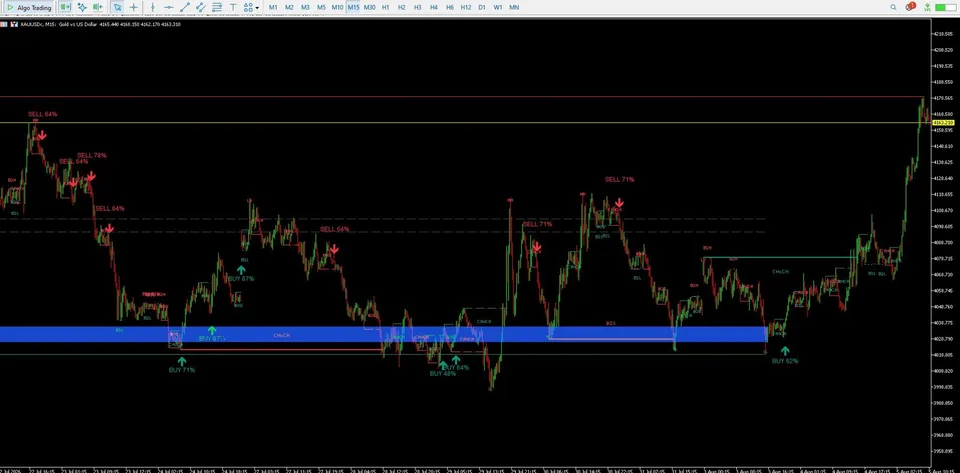
This is the main reason traders choose SMC Buy Sell KPG. Every BUY/SELL signal must pass 3 filter layers:
- Zone Filter: BUY only fires when price is in the lower half (Discount); SELL only fires when price is in the upper half (Premium) of the trailing High-Low range.
- OB Zone Filter: no BUY while inside a Supply Zone (Bearish OB); no SELL while inside a Demand Zone (Bullish OB).
- Per-bar deduplication: each candle produces only one signal in one direction, so no spam.
The result is a clean chart with fewer but higher-quality signals.
d) Win-rate estimation based on confluence
On each signal, the indicator displays “BUY 78%” or “SELL 65%”. This number is calculated based on:
- Swing Trend and Internal Trend direction (with-trend adds points, against-trend subtracts points)
- Price position relative to Premium/Discount
- Distance to the nearest Supply/Demand Zone
- Signal type (BOS adds more than CHoCH)
Win rate is capped between 40% and 92% to avoid unrealistic numbers.
e) Arrow & text distance based on ATR, broker-independent
This is a very practical improvement: the distance from the arrow and BUY/SELL text to the candle is calculated using ATR multiples, not _Point. As a result, the indicator displays well on every symbol, every broker, and every timeframe, without overlapping text or distance misalignment when switching symbols.
f) Self-healing FVG
Fair Value Gaps are redrawn automatically on every chart refresh. If an object is accidentally deleted or hidden, the indicator recreates it. Filled FVGs are automatically removed to keep the chart clean.
g) MTF Highs/Lows & Premium/Discount Zones
- Draws Previous Day / Week / Month High & Low with 3 line styles (solid / dash / dot) and 3 separate colors.
- Draws Premium, Equilibrium and Discount zones with color blending based on the chart background (no harsh glare).
- Displays Strong/Weak High & Low using trailing logic.
h) Multi-channel alerts
Each live signal (not during history loading) can trigger:
- Sound (custom .wav file)
- Popup Alert
- Push Notification to mobile (via MetaQuotes ID)
No spam during history loading: alerts fire only when a new candle closes.
i) Performance optimization
- Historical mode (full, keeping up to 500 structures, 300 signals, 200 FVGs) and Present mode (light, only 60/60/40), suitable for both backtesting and live trading.
- Hard caps on displayed objects (max 50 FVGs, max 25 OBs per type) to keep the chart smooth.
- Automatically detects when the server adds history on the left, then rescans cleanly with no duplicate objects.
3. Who should use SMC Buy Sell KPG?
- Pure SMC traders: need a tool to draw structure, OBs, and FVGs accurately and quickly.
- Price action traders: want to confirm BOS/CHoCH before entering a trade.
- Multi-timeframe traders: need quick reference to D1, W1, MN1 Highs/Lows directly on the chart.
- Beginners learning SMC: visually understand how the market “leaves traces” of smart money.
- EA/Utility users: if you need to convert the indicator into an EA with noise-filtered entries, this is a very suitable logic foundation. For one-click orders on top of this indicator, see SMC Trade Assistant; for a fully custom EA, tell us what you need.
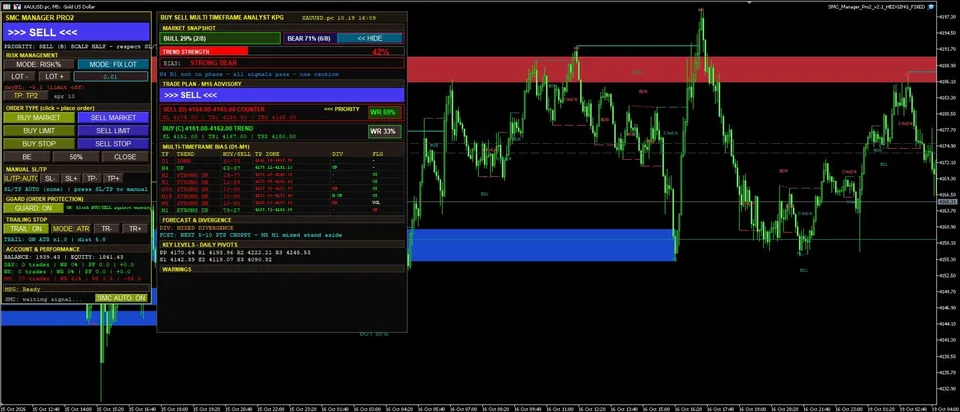
Upgrade · Trade panel
Trade these signals with one click: SMC Trade Assistant
The SMC Buy Sell KPG chart view plus a trade panel: one-click orders, risk-based lot size, break-even and partial close, setup grades A/B/X, a daily loss limit and a panel that reads 8 timeframes at once.
99.99 USD or rent 49.99 USD for 3 months · free demo on MQL5
Or get it free: join the KPG Quant Telegram group and message the team.
Prices from the MQL5 product page, checked 2 Nov 2026. MQL5 always shows the current price.
4. Quick installation
- Download SMC Buy Sell KPG for free from its MQL5 page, then open MetaTrader 5 → File → Open Data Folder.
- Copy the file
SMC Buy Sell KPG-v2.ex5into theMQL5/Indicatorsfolder. - Restart MT5 (or right-click in the Navigator → Refresh).
- Drag the indicator onto the chart and enable/disable feature groups as needed in the Input dialog.
Recommended settings for beginners:
Mode: Historical (full data)Style: Colored (easy to read)SwingLength: 50SignalSource: Swing + Internal StructureSignalZoneFilter: trueSignalOBZoneFilter: trueShowFVG: enable if you trade FVGs, disable if the chart is too clutteredShowMitigatedOB: true if you want to study structure, false if you want an absolutely clean chart
5. Usage notes
- The indicator is a decision-support tool, not a “holy grail.” High win-rate signals still need confirmation from market context (news, trading session, higher-timeframe trend).
- The indicator processes on closed candles. This is an intentional design choice so signals do not “jump” while a candle is still forming.
- Do not run multiple SMC versions on the same chart at the same time, as this can cause object conflicts. If you previously installed an older version, remove it from the Indicators List before installing the new one.
⚠️ Important warning
The signals and information provided by the SMC Buy Sell KPG indicator are for educational and reference purposes only. They are NOT investment advice and NOT a recommendation to buy or sell any financial product. Financial markets always involve risk, and every trading decision is your own responsibility. Carefully consider your financial situation, risk tolerance, and consult independent professional advice before making any investment decision.
This tool provides analytical assistance. Trading involves risk. Past performance does not guarantee future results. Manage your capital responsibly.